
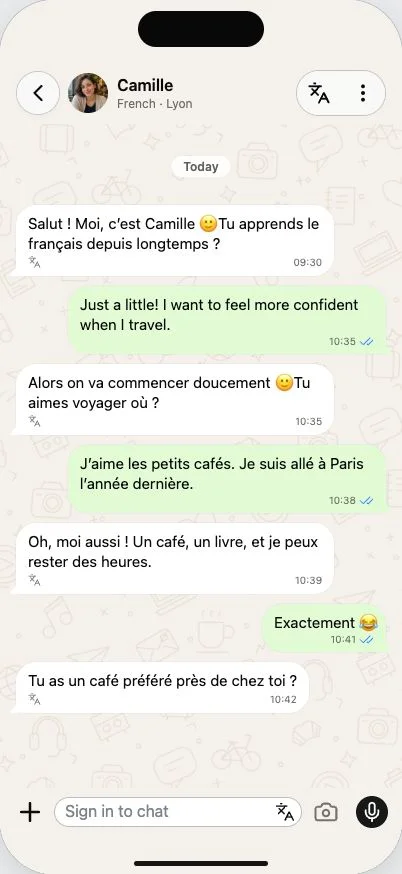
A chat you can come back to
An AI language partner gives you someone to practise with when you do not have a conversation partner nearby. In Merdi, that practice happens in an ongoing chat with a named character. Open the conversation, say what is on your mind, and reply when you are ready.
You might tell Camille about a café you found, ask Jules about a weekend away, or talk through dinner ideas with Malik. The starting characters have different interests and settings, so the same language can lead to very different conversations. Their background gives you a starting point; you do not have to stay on a prescribed topic.
Write something that matters to you
You do not need a perfect opening line. A small message about your day gives the conversation somewhere to go. Start with the words you know, use a little English if you get stuck, and build from the reply. Choose a beginner, intermediate or advanced conversation level to guide the vocabulary and complexity.
The point is to practise forming your own response. Reading a translated message is useful, but replying adds another step: choosing what you mean and finding a way to say it. Merdi keeps the messages together so you can return to the same conversation instead of beginning a new exercise each time.
Help alongside the message
Tap the translation control to reveal the meaning of a reply in English. When a correction is useful, a short teaching note can appear beside it. You can also ask the character what an expression means or try writing a sentence another way.
This is conversation practice rather than a complete course. There is no promised fluency timeline, pronunciation score or certificate. Pair it with listening, reading and conversations with people as your confidence grows. Merdi’s role is to make a little everyday practice easier to start.
Try your first exchange
Open Merdi in your browser, sign in, and choose a character from Friends. Pick a level, then send one message about something you did today. If you would rather explore a written example first, the French conversation page has a small interactive chat without an account.
Want a starting line? Try the guide to starting a French conversation, then change the example so it sounds like you.