
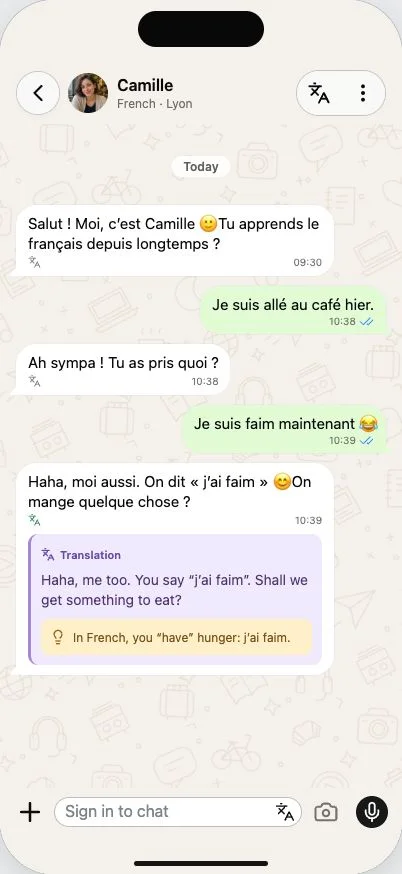
Keep the meaning next to the message
Language learning chat with translation gives you a way through the moments when you understand most of a reply, but not quite enough to answer. In Merdi, the English meaning sits under the character’s message. Open it, read it, and return to the same conversation.
You can try reading the target language first or use the translation straight away. The original stays visible, so you can compare the wording instead of replacing it. A phrase makes more sense when you can still see the question or story it belongs to.
A correction you can use immediately
Suppose you write “Je suis faim.” A reply can show you “J’ai faim” and explain briefly that French uses “have” for hunger. The useful part is what comes next: you can use the phrase in a message about lunch, rather than just recognising it in an exercise.
Corrections and translations have separate visual treatments. The translation tells you what the reply means; a teaching note explains a useful point. Notes are intended to help when needed, not turn every ordinary exchange into a lesson. You can ask “Why do you use that word?” or “Is my sentence natural?” for more focused help.
Make the next reply a little more your own
If you are starting out, send one short sentence, read the answer and try borrowing a small piece of it. When you are more comfortable, leave the translations closed until you reach an unfamiliar expression. Your selected conversation level helps guide the complexity, but you can always ask for simpler wording.
Mixing in an English word is a reasonable way to keep going when you are stuck. Ask how to express it, then try the new phrase yourself. There is no need to wait until you can write a flawless message before joining the conversation.
Useful help, with room to check
AI explanations can be wrong or miss a nuance. Treat a surprising correction as a reason to ask a follow-up or check a trusted reference, especially when a phrase depends on context or region. Merdi does not assess pronunciation or replace a full language course.
For a small example you can explore without signing in, try the French conversation preview. The French texting guide also explains everyday expressions you can practise in your next chat.