
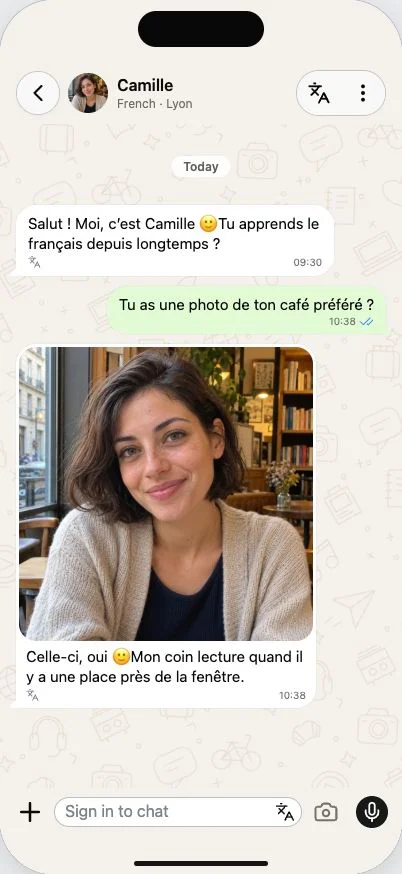
Something concrete to describe
Learning a language with photos gives you a subject before you have found the words. A picture of lunch, a bookshelf or a place you visited can start a conversation about what you see, what you like or what you did there.
In Merdi, you can send an image in a chat and add a question in your learning language. You might ask for the name of an object, describe the scene in a short sentence, or ask the character to help you say what you mean. The image stays with the conversation, so later messages have context.
Add a question, not just an upload
Choose a photo from your device, or use the camera where available. Then tell the character what you want to practise. “How would I describe this meal?” gives a different direction from “Can you help me talk about my weekend?” Even one short sentence helps make the exchange specific.
The aim is to use the picture as a starting point for your own language. After reading the reply, try describing another detail or asking a follow-up. The same translation controls and short teaching notes are available when you need help understanding the answer.
Pictures from the character’s world
A character can also send a picture when it fits the conversation. Merdi uses a prepared photo collection associated with the character’s background or saved experiences. The conversation can draw on those images later, instead of generating a new picture while you wait for every answer.
For example, a chat about cafés may have a suitable character photo to share. Another topic may work better as text. The model chooses whether an available image adds something; there is no promise of a picture on demand or a photo attached to every message.
Turn one picture into a conversation
Start with what is in the frame, then make it personal. A meal can lead to a favourite recipe. A book can lead to what you like reading. A holiday photo can lead to a story about getting lost or meeting someone new.
Try describing three details without a translation first. Read the reply, open the language help if you need it, and describe one more thing. You can ask for a simpler phrase or a more natural way to say the same idea. See how translations and corrections fit beneath the message while you keep talking.